
Cameras 101: Everything You Need to Know as a Beginner

If you’re starting from zero, don’t worry. You don’t need to understand every technical specification to choose a good camera. You need to understand how cameras work, the different types, what the specifications mean, and which camera is best for each purpose.
Since you’re interested in cameras, understanding cameras will help you compare brands, explain products to customers, and decide which cameras are worth buying.
Let’s start with the fundamentals and work toward professional-level knowledge.
1. What exactly is a camera?


A camera is a device that captures light and turns it into a photograph or video.
Every digital camera has a few essential parts:
- Lens: Collects and focuses light onto the sensor.
- Image sensor: Converts light into digital image information.
- Processor: Processes the information to create the final photo or video.
- Shutter: Controls how long light is captured for a photo, either mechanically or electronically.
- Autofocus system: Helps the camera focus on the subject.
- Storage: Saves photos and videos to a memory card or internal storage.
- Battery: Powers the camera and its electronics.
- Display or viewfinder: Helps you compose your shot and review the result.
Think of the camera sensor as the eye, the lens as the eye’s focusing system, and the processor as the brain.
An important principle: a camera with the highest megapixel count isn’t automatically the best camera. Lens quality, sensor performance, autofocus, image processing, stabilization, and the person using it all affect the final result.
2. The main types of cameras
This is the first major distinction you should understand. Different camera types solve different problems.
1. Mirrorless cameras
Versatile
These are popular choices for photography, YouTube, professional video, weddings, and commercial content.
- Interchangeable lenses
- Usually excellent image quality
- Strong video capabilities on many models
- Advanced autofocus on many modern cameras
Examples: Sony Alpha, Canon EOS R, Nikon Z, Fujifilm X and GFX, Panasonic Lumix.
2. DSLR cameras
Traditional interchangeable-lens cameras that use a mirror and usually an optical viewfinder.
- Good image quality
- Large selection of used lenses
- Often good value second-hand
- Typically larger and heavier than comparable mirrorless models
Examples: Canon EOS 5D, Canon EOS 90D, Nikon D7500 and D850.
3. Compact cameras
Small cameras, generally with a built-in lens.
- Easy to carry
- Simple operation
- No need to purchase separate lenses
- Quality and zoom capabilities vary significantly by model
Examples: Sony RX100 series, Canon PowerShot G7 X series, and some travel zoom cameras.
4. Action cameras
Small, rugged cameras made for movement, adventure, sports, and first-person footage.
- Compact and easy to mount
- Excellent electronic stabilization on many models
- Often waterproof or water-resistant with specified limits
- Wide-angle footage
- Small sensors compared with many mirrorless cameras
Examples: GoPro HERO, DJI Osmo Action, Insta360 Ace series.
5. 360-degree cameras
Cameras designed to capture the surroundings in every direction.
- Two or more ultra-wide lenses are commonly used
- You can choose the viewing angle after recording
- Useful for travel, cycling, immersive footage, and creative social media videos
- Reframing and stitching can reduce effective image detail
Examples: Insta360 X series, GoPro MAX.
6. Gimbal and pocket cameras
Small cameras built around a handheld stabilizer or compact motorized gimbal.
- Smooth moving footage
- Often have subject tracking
- Convenient for walking videos, vlogging, and travel
- Usually less flexible than an interchangeable-lens system
Examples: DJI Osmo Pocket series.
7. Drone cameras
Cameras mounted on flying drones for aerial photography and video.
- Aerial perspectives
- Stabilized video on many models
- Useful for real estate, tourism, and landscape content
- Flight time, transmission range, regulations, and weather matter
Examples: DJI Mini and Mavic series.
8. Smartphone cameras
The most accessible cameras for everyday content.
- Computational photography combines multiple exposures and software processing
- Excellent convenience and sharing
- Usually fixed small sensors and limited optical flexibility
- Often better than dedicated cameras for quick, effortless social media publishing
Examples: Apple iPhone, Samsung Galaxy S, Google Pixel.
Key takeaway: A mirrorless camera is a strong all-round choice for professional photography and video, while an action camera or 360 camera makes more sense when compact size, mounting, durability, or unusual perspectives are the priority.
3. Camera sensor size: One of the most important concepts
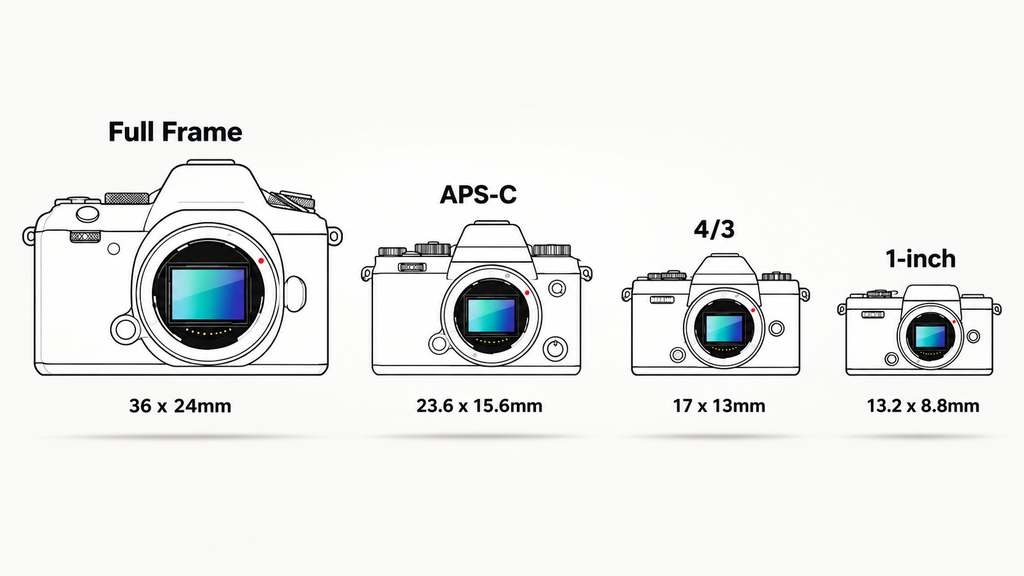
The sensor captures light. Its size influences low-light performance, dynamic range, depth of field, and the overall image quality a camera can achieve.
Common sensor sizes, from larger to smaller:
Full frame
36 × 24 mm
Popular in professional photography, portraits, weddings, and demanding low-light work.
APS-C
Around 24 × 16 mm
A popular balance of image quality, size, price, and lens options.
Micro Four Thirds
17.3 × 13 mm
Common in compact interchangeable-lens systems, including some video-focused setups.
1-inch type
Smaller than Micro Four Thirds
Used in some premium compact cameras and pocket gimbal cameras.
Small sensors
Common in action cameras and phones
Help keep devices small and lightweight, though low-light performance depends on the entire imaging system.
These are broad categories; actual dimensions and performance vary by model.
Why does sensor size matter?
Imagine taking a picture in a dimly lit room.
- A larger sensor can generally collect more total light at comparable exposure settings and framing, helping reduce image noise.
- A larger sensor can make it easier to achieve a blurred background, depending on the lens, aperture, and shooting distance.
- A smaller sensor can provide greater depth of field at equivalent framing and aperture, which can be useful for action footage.
- A smaller sensor makes it easier to build a compact, lightweight camera.
However, a larger sensor doesn’t guarantee a better photograph. Lighting, lens quality, autofocus, processing, and technique still matter.
Beginner’s recommendation: APS-C is an excellent starting point if you want a camera for product photography, YouTube videos, or general content creation without immediately investing in an expensive full-frame system.
4. Megapixels: What do 12 MP, 24 MP, and 48 MP mean?
A megapixel is one million pixels. Pixels are the tiny picture elements that make up a digital image.
For example:
- 12 MP: around 12 million pixels.
- 24 MP: around 24 million pixels.
- 48 MP: around 48 million pixels.
More megapixels can provide more detail, allow larger prints, and give you more flexibility to crop a photo.
But consider this comparison:
| Specification | Camera A | Camera B |
|---|---|---|
| Resolution | 24 MP | 48 MP |
| Sensor | APS-C | Small sensor |
| Lens | High-quality | Basic |
| Low-light capability | Potentially better | Depends on design |
| Overall winner | Not determined by MP alone | Not determined by MP alone |
A 24 MP camera can produce better photographs than a 48 MP camera. Pixel count alone doesn’t tell you how well a camera captures light, resolves detail, focuses, or processes an image.
What to remember: For most beginners, 20–30 MP is already plenty for photography, product images, and social media content.
5. Camera lenses: The other half of the camera
A lens determines how much of the scene you see, how close distant subjects appear, how much light reaches the sensor, and how the background looks.
With interchangeable-lens cameras, you can change lenses depending on the job.
Focal length explained
Focal length is measured in millimeters (mm). On the same sensor format, a shorter focal length captures a wider view, while a longer focal length makes distant subjects appear closer.
Wide angle: 10–24 mm
Captures a broad field of view. Useful for landscapes, architecture, small rooms, and establishing shots.
Standard: 35–50 mm
Useful for everyday photography, portraits, street photography, and natural-looking product shots.
Telephoto: 70–200 mm and beyond
Brings distant subjects closer. Useful for sports, wildlife, and portraits with a tighter composition.
Macro lenses
Designed for close-up photography of small objects, textures, jewelry, and electronic components.
These are approximate categories, not strict boundaries. Sensor size changes the angle of view, so a 35 mm lens doesn’t look identical on full-frame and APS-C cameras.
Prime lenses vs. zoom lenses
Prime lens
Has one fixed focal length, such as 35 mm or 50 mm.
- Often compact
- Can offer a wide aperture
- Requires you to move to change framing
Zoom lens
Covers a range, such as 18–55 mm or 24–70 mm.
- More framing flexibility
- Convenient for travel and events
- Maximum aperture depends on the lens
For a beginner, a kit zoom lens is often a sensible starting point. Learn which focal lengths you actually use before buying more lenses.
6. The exposure triangle: How to control brightness
This is one of the most important photography concepts. Three settings work together to control exposure: aperture, shutter speed, and ISO.
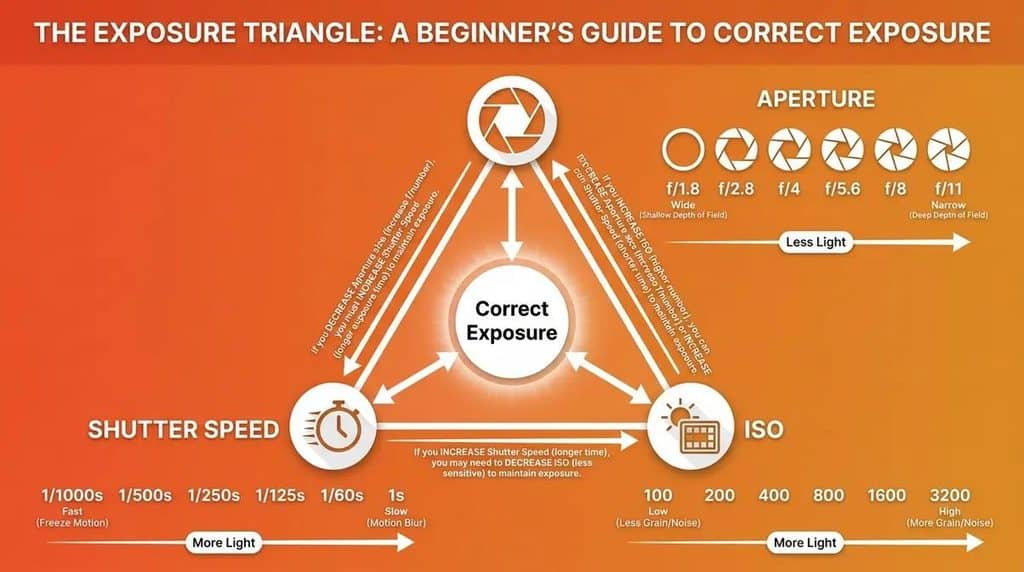
A. Aperture — the lens opening
Aperture is expressed as an f-number, such as f/1.8, f/2.8, f/5.6, or f/11.
- Lower f-number = wider opening, more light, and generally more background blur.
- Higher f-number = narrower opening, less light, and generally more of the scene in focus.
Example:
- f/1.8: helpful for portraits and dim indoor scenes.
- f/4: a useful middle ground for many situations.
- f/8: useful for product photographs when you want more of the object in focus.
A wide aperture doesn’t automatically create a beautiful image, and very shallow depth of field can make parts of a product look unintentionally blurry.
B. Shutter speed — how long light is captured
Shutter speed controls how long the camera captures light in a still photo.
- 1/1000 second: freezes fast action more effectively.
- 1/250 second: useful for many moving subjects.
- 1/60 second: can work for relatively still subjects, depending on your lens and technique.
- 1 second: creates motion blur if subjects move.
For video, shutter speed also affects how natural or sharp movement appears. You usually don’t want to treat video shutter speed the same way as still photography.
C. ISO — the brightness trade-off
ISO describes the camera’s exposure sensitivity setting and signal amplification behavior.
- ISO 100: generally clean image quality in good light.
- ISO 400–800: useful when light is lower.
- ISO 1600 and above: can help in dim environments but may introduce more visible noise, depending on the camera.
Raising ISO can help you use a faster shutter speed or a narrower aperture, but it doesn’t replace good lighting.
7. Video specifications: 1080p, 4K, 5.3K and 8K
A camera’s video specifications can look complicated, but the main terms are easy to understand.
| Term | What it means |
|---|---|
| 1080p / Full HD | 1920 × 1080 pixels |
| 4K UHD | 3840 × 2160 pixels |
| 5.3K | A higher-resolution format used by some action cameras |
| 8K UHD | 7680 × 4320 pixels |
| 24 fps | 24 frames recorded per second |
| 30 fps | 30 frames recorded per second |
| 60 fps | 60 frames recorded per second |
| 120 fps | High frame rate that can enable slow motion |
| Bitrate | How much data is used to encode video per second |
| Codec | The method used to compress and store video |
What resolution should you choose?
1080p
Good for everyday social media videos and smaller files. Still useful when storage or editing performance is limited.
4K
A strong all-round choice for product videos, YouTube, travel, and commercial content. Gives you more room to crop while maintaining detail.
5.3K and 8K
Useful when you specifically need extra resolution, cropping flexibility, or specialist production workflows. They require more storage and processing power.
Important: A camera advertising 4K doesn’t necessarily produce better video than every 1080p camera. Lens quality, sensor performance, lighting, frame rate, autofocus, stabilization, bitrate, and processing also matter.
Frame rate: 24 vs. 30 vs. 60 vs. 120 fps
- 24 fps: A traditional cinematic look.
- 30 fps: Common for online video and general content.
- 60 fps: Smoother motion, especially for action.
- 120 fps: Useful for slow motion when played back at a lower frame rate.
For example, footage recorded at 120 fps and played back at 30 fps can produce four times slower playback, provided the recording and editing workflow supports it.
What is stabilization?
Stabilization reduces the appearance of camera shake.
OIS — Optical Image Stabilization
Uses moving optical elements, or a moving sensor in some designs, to compensate for camera movement.
EIS — Electronic Image Stabilization
Uses image processing to reduce shake, often by cropping some of the image.
Mechanical gimbal
Uses motors to physically stabilize the camera, making it useful for smooth moving shots.
For walking footage, action cameras and pocket gimbal cameras can be very convenient. For controlled studio video, a tripod may be more useful than expensive stabilization.
8. Autofocus: How cameras keep subjects sharp
Autofocus (AF) automatically adjusts focus to keep a subject clear. This is especially important when filming people, moving objects, and products.
Here are the terms you’ll see in camera specifications.
- Eye AF: Detects and focuses on a person’s eye.
- Face detection: Identifies faces and helps maintain focus on them.
- Subject tracking: Attempts to keep a moving subject in focus as it moves through the frame.
- Animal AF: Detects supported animals, depending on the camera.
- Continuous AF (AF-C): Continually adjusts focus while a subject moves.
- Single AF (AF-S): Focuses once when activated, usually suitable for stationary subjects.
- Manual focus: Lets you adjust focus yourself.
Which autofocus matters for different users?
| Use case | What to prioritize |
|---|---|
| YouTube presenter | Reliable face and eye tracking |
| Product photography | Accurate focus and manual focus control |
| Sports | Continuous AF and subject tracking |
| Wildlife | Animal detection and tracking |
| Vlogging | Reliable tracking and a usable screen |
| Macro photography | Precise close-up focus |
Don’t judge autofocus purely by the number of focus points in a specification sheet. Real-world tracking performance matters more.
9. Photography Features Worth Knowing
These features are important when comparing mid-range and professional cameras, especially for photography, vlogging, and video production.
| Feature | What It Means | Why It Matters |
|---|---|---|
| Dynamic Range | The camera’s ability to capture detail in bright highlights and dark shadows | Helps preserve details in sunsets, window-lit rooms, and challenging lighting conditions |
| RAW vs. JPEG | RAW files retain more editing flexibility, while JPEG files are processed and ready to share | RAW is useful for detailed post-processing; JPEG is convenient for everyday photography |
| EVF and LCD | An electronic viewfinder (EVF) lets you compose through an eyepiece, while an LCD screen displays the live image | A flip-out LCD is useful for vlogging, selfies, and shooting at different angles |
| Burst Shooting | The number of still photos a camera can capture per second, measured in frames per second (fps) | Helps capture sports, wildlife, and fast-moving subjects; performance also depends on autofocus, shutter type, and buffer capacity |
| Hot Shoe and Microphone Input | A hot shoe supports compatible accessories, while a microphone input connects an external microphone | Useful for adding accessories and improving audio quality when recording video |
| Connectivity | Features such as Wi-Fi, Bluetooth, USB-C, and HDMI | Supports wireless transfers, remote control, streaming, and external recording, depending on the camera model |
Quick takeaway: For photography, prioritize dynamic range, RAW support, autofocus, and burst shooting. For video creation, pay closer attention to the LCD screen, microphone input, connectivity, and external recording capabilities.
10. Camera Brands: Who Makes What?
Understanding major camera brands helps you compare their product ranges and choose the right camera for photography, video creation, travel, or action recording.
| Camera Brand | Best Known For | Main Camera Types |
|---|---|---|
| Sony | Advanced autofocus, video features, and a broad E-mount lens ecosystem | Full-frame and APS-C mirrorless cameras |
| Canon | Beginner-friendly options, professional photography, and its RF lens system | Mirrorless, DSLR (older systems), and compact cameras |
| Nikon | Photography performance, ergonomics, and its Z-mount lens system | Full-frame and APS-C mirrorless cameras |
| Fujifilm | Film simulations, color profiles, retro designs, and medium-format photography | APS-C and medium-format mirrorless cameras |
| Panasonic Lumix | Video production, hybrid shooting, and advanced video features | Micro Four Thirds and full-frame mirrorless cameras |
| OM System | Lightweight camera systems, travel photography, and outdoor shooting | Micro Four Thirds mirrorless cameras |
| GoPro | Rugged, waterproof cameras and action footage | Action cameras |
| DJI | Image stabilization, drones, and portable video recording | Action cameras, 360 cameras, pocket gimbal cameras, and drones |
| Insta360 | Immersive 360-degree footage and creative action recording | 360 cameras, action cameras, and compact cameras |
Quick takeaway: Sony, Canon, Nikon, and Fujifilm are strong choices for interchangeable-lens photography. Panasonic Lumix is particularly popular with video creators, while GoPro, DJI, and Insta360 focus more on action recording, stabilization, portability, and immersive video.
These brands aren’t directly interchangeable in every category. Sony, Canon, Nikon, Fujifilm, and Panasonic compete across many photography and video applications, whereas GoPro and Insta360 are especially relevant to action and immersive cameras.
11. Action camera vs. 360 camera vs. pocket camera vs. mirrorless
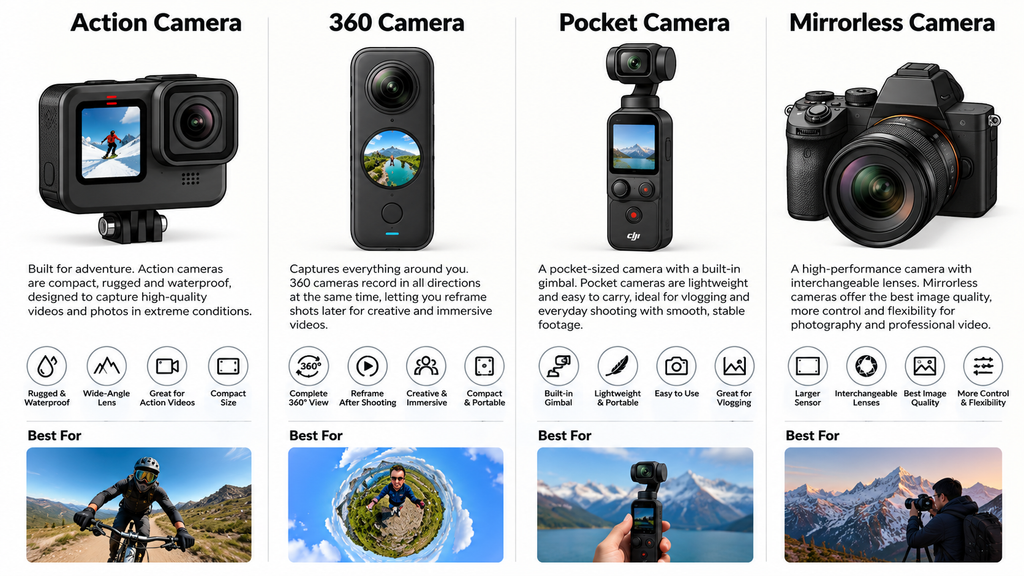
This distinction is important because these categories often compete for the same customer.
Action camera
Best for riding, trekking, water sports, helmet footage, and rugged use. You choose the direction before recording.
360 camera
Captures a full spherical view so you can choose the framing later. Great for creative travel footage, but requires more editing.
Pocket gimbal camera
Best for handheld vlogging, walk-and-talk videos, and smooth everyday footage without carrying a larger camera.
Mirrorless camera
Best when image control, lens selection, product detail, low-light capability, or professional photography is the priority.
For the specific differences between action cameras and 360 cameras, the key trade-off is usually straightforward: a conventional action camera concentrates its image resolution on one direction, while a 360 camera gives you greater freedom to reframe after recording.
12. Accessories you need to understand
A camera’s total cost isn’t just the body price. Lenses, batteries, storage, mounts, lighting, and audio equipment can make a substantial difference.
Memory cards
SD cards are common in mirrorless cameras; microSD cards are common in action cameras. Check capacity limits, supported standards, and sustained write speed. For high-bitrate video, the speed class matters.
Batteries and chargers
Spare batteries reduce interruptions. Recording at high resolutions, using wireless connections, and working in cold weather can reduce battery life.
Tripods and mounts
Tripods help with static product photography and talking-head videos. Action-camera mounts let you attach a camera to helmets, handlebars, and other compatible mounting points.
Microphones
An external microphone can improve speech clarity considerably. Check whether the camera accepts a microphone directly or needs a compatible adapter or external recorder.
Lighting
A softbox or LED light can improve product images and videos more than upgrading to a more expensive camera in some situations.
Protection and cleaning
Camera bags, lens caps, cleaning cloths, and an air blower help protect the equipment. Avoid touching the sensor or cleaning it with unsuitable materials.
A useful rule: when planning a purchase, budget for the entire setup, not just the camera body.
13. How to choose a camera for a specific purpose
The best camera depends on what you’re trying to achieve.
Product photography
Prioritize good image quality, accurate focus, a suitable lens, lighting, and manual controls. A tripod and soft lighting are often excellent investments.
YouTube and indoor video
Look for reliable autofocus, a flip screen, good 4K video, external microphone support, and dependable recording without overheating.
Adventure and sports
Prioritize stabilization, durability, mounting options, battery life, and waterproofing at the intended depth.
Travel and vlogging
A pocket gimbal camera or action camera may be more practical than a mirrorless system because it is lighter and faster to use.
Professional photography
Consider the full system: sensor performance, lens selection, autofocus, handling, flash compatibility, reliability, and service availability.
What should you check before buying?
Use this checklist for any camera you consider:
- Does it suit your main purpose?
- Is the sensor size appropriate for your needs?
- Does it record the resolution and frame rates you need?
- Is autofocus reliable for your subject?
- Does it have stabilization, if you need it?
- Can you connect the microphone or other accessories you want?
- Are compatible lenses, batteries, memory cards, and mounts available?
- Is battery life sufficient for your recording sessions?
- Can you get warranty support and repairs?
- What is the total cost of the complete setup?
14. A practical beginner’s guide to camera settings
You can use these as starting points when experimenting. They aren’t universal presets; adjust them to the camera, available light, and desired look.
| Situation | Starting point |
|---|---|
| Stationary product photo | ISO 100–400, f/5.6–f/8, tripod |
| Portrait with background blur | Wide aperture, such as f/1.8–f/2.8 |
| Outdoor moving subject | Shutter around 1/500 sec or faster |
| General video at 30 fps | Shutter around 1/60 sec |
| Slow-motion video at 60 fps | Shutter around 1/120 sec |
| Slow-motion video at 120 fps | Shutter around 1/240 sec |
For video, these shutter-speed suggestions follow a common starting point of approximately twice the frame rate. You may choose different settings for creative motion effects or difficult lighting.
The simplest way to improve your images is to learn how to control light, focus, and composition before worrying about every advanced setting.
15. Camera terminology you should memorize
Here is a quick glossary of terms you’ll encounter in product listings, reviews, and customer conversations.
| Term | Simple meaning |
|---|---|
| Sensor | Captures light to create the image |
| Megapixels | Image resolution |
| Focal length | Determines the lens’s field of view |
| Aperture | Lens opening that affects light and depth of field |
| ISO | Exposure sensitivity setting |
| Shutter speed | Duration of exposure for a photo |
| Depth of field | How much of the scene appears in focus |
| Bokeh | The aesthetic quality of out-of-focus areas |
| OIS | Optical image stabilization |
| EIS | Electronic image stabilization |
| IBIS | In-body image stabilization |
| AF | Autofocus |
| RAW | Image file with substantial editing flexibility |
| JPEG | Processed, widely compatible image file |
| FPS | Frames per second; used for video and burst shooting |
| Bitrate | Video data encoded per second |
| Dynamic range | Ability to retain detail across bright and dark areas |
| Crop factor | How sensor size changes the field of view for a given lens |
| Interchangeable lens | A lens that can be removed and replaced |
| Waterproof rating | Defined water-resistance capability under specified conditions |
16. If you want to understand the camera
- Understand the categories. Know the differences between mirrorless, action, 360-degree, compact, and pocket gimbal cameras.
- Learn the major brands. Start with Sony, Canon, Nikon, Fujifilm, GoPro, DJI, and Insta360.
- Compare products by use case. For example, compare action cameras with action cameras rather than comparing every camera in one ranking.
- Learn the specifications that affect buying decisions. Sensor size, resolution, frame rates, stabilization, waterproofing, battery life, and connectivity.
- Understand the complete accessory ecosystem. Mounts, memory cards, batteries, chargers, microphones, and replacement parts can influence the total purchase.
- Study warranty and local availability. A camera that looks good on paper may be less attractive if customers cannot obtain compatible accessories or reliable after-sales service.
For further learning, these are useful resources:
- Sony Camera Basics — Learn focal length, exposure, autofocus, and other fundamentals.
- Canon Outside of Auto — Learn aperture, ISO, shutter speed, and exposure.
- Nikon Learn and Explore — Understand the exposure triangle.