
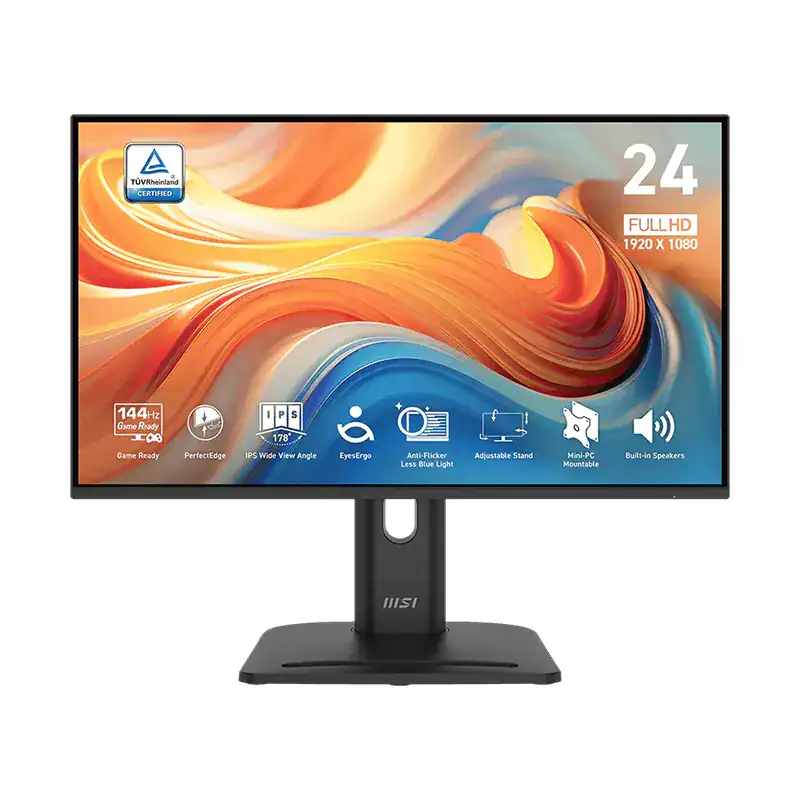

MSI PRO MP245PG E14 24-Inch FHD 140Hz IPS Monitor
₨ 27,499.00
- Model: PRO MP245PG E14
- Screen Size: 24 inches
- Panel Type: IPS
- Resolution: 1920 × 1080 (FHD)
- Refresh Rate: 140Hz
- Response Time: 1ms (MPRT)
- Aspect Ratio: 16:9
- Connectivity: 1 × HDMI, 1 × DisplayPort, 1 × VGA (D-Sub)
- Adaptive-Sync: Supported
- HDR: HDR Ready
- Eye Care: MSI EyesErgo, Anti-Flicker, Less Blue Light
MSI PRO MP245PG E14 24-Inch FHD 140Hz IPS Monitor is designed for work, gaming, study, and everyday computing. It features a 1920 × 1080 resolution, 140Hz refresh rate, 1ms MPRT response time, Adaptive-Sync technology, HDR support, and multiple connectivity options, including HDMI, DisplayPort, and VGA.
With MSI EyesErgo technology, ergonomic stand adjustments, and a 4-sided adjustable design, the MSI PRO MP245PG E14 provides smooth performance and comfortable viewing for extended use.
Safety Information
Follow these safety guidelines to protect the monitor and ensure safe operation:
- Disconnect the power cable before cleaning the monitor.
- Keep the monitor away from rain, water, and excessive moisture.
- Do not open the monitor casing. Servicing should be performed by qualified technicians.
- Place the monitor on a stable, flat surface.
- Keep the ventilation openings clear.
- Use the supplied power cable and compatible cables.
Package Contents
- MSI PRO MP245PG E14 Monitor
- Monitor Stand
- Stand Base
- Power Cable
- HDMI Cable
- Quick Start Guide
- Warranty Card
How to Set Up the MSI PRO MP245PG E14
1. Assemble the Monitor Stand
Carefully remove the monitor and stand components from the packaging. Attach the stand neck to the monitor and secure it according to the instructions provided. Then attach the stand base using the supplied screws.
2. Connect the Cables
- HDMI: For compatible PCs, laptops, consoles, and other devices
- DisplayPort: For high-refresh-rate PC gaming and video output
- VGA (D-Sub): For compatible older computers and devices
3. Turn On the Monitor
After connecting the cables, press the power button to turn on the monitor. The display should automatically detect the active input source. If the screen does not display an image, select the correct input source through the On-Screen Display (OSD) menu.
Monitor Controls and OSD Settings
The OSD menu allows you to customize the monitor’s display and performance settings.
You can adjust:
- Brightness and contrast
- Color temperature and gamma
- Input source
- Refresh rate
- Adaptive-Sync
- HDR settings
- Anti-Flicker
- Less Blue Light
- Other MSI EyesErgo features
For the smoothest experience, configure your computer to use the monitor’s native 1920 × 1080 resolution and up to 140Hz refresh rate.
Adaptive-Sync for Smooth Gaming
Adaptive-Sync helps synchronize the monitor’s refresh rate with the graphics card’s frame output. This reduces screen tearing and stuttering for smoother gaming and video playback.
MSI EyesErgo Eye-Care Technology
The MSI PRO MP245PG E14 includes eye-care features designed for comfortable long-term viewing. Anti-Flicker technology helps reduce visible screen flickering, while Less Blue Light modes help reduce blue light exposure.
These features are useful for users who spend extended periods working, studying, browsing, or gaming.
Ergonomic Adjustments
The adjustable stand allows you to position the monitor for a more comfortable viewing angle.
- Tilt: -5° to 20°
- Swivel: -45° to 45°
- Height Adjustment: Up to 130mm
- Pivot: 90° rotation for portrait mode
These adjustments allow you to customize the monitor position according to your desk setup and viewing preferences.
VESA Mount Compatibility
The MSI PRO MP245PG E14 supports 75 × 75mm VESA mounting. You can remove the included stand and attach the monitor to a compatible monitor arm or wall mount.
Always ensure that the mounting bracket is compatible with the monitor’s weight and VESA specification before installation.
Monitor Maintenance
Cleaning
- Unplug the monitor before cleaning.
- Use a soft, lint-free cloth.
- Lightly dampen the cloth with water or a suitable non-abrasive screen cleaner.
- Do not spray liquid directly onto the screen.
- Avoid benzene, thinner, ammonia-based cleaners, and abrasive chemicals.
Storage
If you are storing the monitor for an extended period, keep it clean and dry in a cool, well-ventilated area. Use the original packaging where possible to protect the monitor from dust and damage.
Troubleshooting
No Image on the Screen
- Check that the monitor is powered on.
- Make sure the power cable is securely connected.
- Check the HDMI, DisplayPort, or VGA connection.
- Select the correct input source from the OSD menu.
- Try another video cable or compatible device.
Blurry or Distorted Image
- Set the display resolution to 1920 × 1080.
- Set the refresh rate to the desired setting, up to 140Hz.
- Check the video cable for damage or loose connections.
- Use the monitor’s Auto Adjust function where available, especially with VGA connections.
Screen Flickering
- Check the video cable connections.
- Enable or disable Adaptive-Sync to test the display.
- Enable Anti-Flicker mode.
- Check for interference from nearby electronic devices.
No Audio
- Make sure the audio source is correctly connected.
- Check the volume settings on your computer.
- Select the correct audio output device.
- Check the audio settings when using HDMI or DisplayPort.
MSI PRO MP245PG E14 Specifications
- Model: PRO MP245PG E14
- Screen Size: 24 inches
- Panel Type: IPS
- Resolution: 1920 × 1080 (FHD)
- Refresh Rate: 140Hz
- Response Time: 1ms (MPRT)
- Aspect Ratio: 16:9
- Connectivity: 1 × HDMI, 1 × DisplayPort, 1 × VGA (D-Sub)
- Adaptive-Sync: Supported
- HDR: HDR Ready
- Eye Care: MSI EyesErgo, Anti-Flicker, Less Blue Light
- VESA Mounting: 75 × 75mm
- Stand Adjustments: Tilt, Swivel, Height Adjustment, Pivot
- Built-in Speakers: Yes
- Dimensions: 53.92 × 31.47 × 51.92 cm with stand
- Weight: 7.26 kg with stand
- Color: Black
Warranty Information
MSI PRO MP245PG E14 24-Inch FHD 140Hz IPS Monitor includes a limited warranty. Warranty terms may vary depending on the region and purchase date. Keep your purchase receipt and warranty documents for future service or warranty claims.
The MSI PRO MP245PG E14 is a versatile 24-inch Full HD IPS monitor for users who want a high 140Hz refresh rate, smooth Adaptive-Sync performance, flexible connectivity, ergonomic adjustment, and comfortable viewing for work, gaming, and everyday use.
Related products





HUAWEI MateView 28.2-inch 4K+ Ultra HD Monitor
In stock
Original price was: ₨ 140,000.00.₨ 128,499.00Current price is: ₨ 128,499.00.




Reviews
There are no reviews yet.